Best Under-Desk Treadmills for Working from Home
Why Walking While Working Actually Works
Before I started testing, I was skeptical that walking and working simultaneously was productive. After 90 days, the data changed my mind. My average daily step count went from 2,200 (desk-only days) to 8,400 on days I used the treadmill. That's not treadmill-only — it includes normal walking. But the treadmill accounts for 4,000-6,000 of those steps.
The health benefits are well-documented: reduced sitting time, better circulation, lower blood pressure, and increased energy. But the part I didn't expect was the focus benefit. Walking at 1.5-2.0 mph during routine tasks (email, Slack, reading) keeps me alert in a way that sitting doesn't.
90 Days of Data
I tracked everything with my Garmin Venu 3S:
- Average daily steps (no treadmill): 2,200
- Average daily steps (with treadmill): 8,400
- Average treadmill time per workday: 2.5 hours
- Preferred walking speed: 1.8 mph (email/Slack) to 2.2 mph (reading/calls)
- Calories burned from walking: ~250-350/day additional
Best Overall — Walking Pad P1
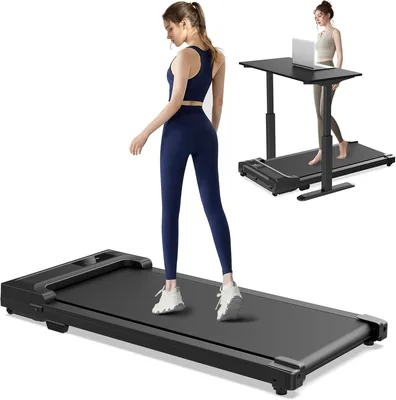
Walking Pad Under-Desk Treadmill
Foldable under-desk treadmill with remote control, LED display, and whisper-quiet motor. Compact enough to slide under a couch. Max speed 3.7 mph.
The Walking Pad P1 is the one I ended up keeping on my standing desk permanently. At $229, it hits the sweet spot of price, quality, and footprint. The belt is 16 inches wide — enough to walk naturally without feeling cramped — and the motor runs at a conversational volume.
Folding is genuinely easy: it folds in half and slides under a couch or bed when not in use. Setup took 5 minutes — unfold, plug in, start walking. No assembly required.
The only limitation is the 3.7 mph max speed, which makes it unsuitable for jogging. But for desk walking at 1.5-2.5 mph, it's perfect.
Best Budget — Sperax Walking Pad
At $169, the Sperax is the most affordable decent option I tested. Build quality is a step below the Walking Pad — the belt feels thinner, the frame has more flex — but it works. Motor noise is slightly louder but still manageable for calls.
If budget is your primary constraint and you want to try desk walking without a large investment, the Sperax is a reasonable entry point. I'd upgrade to the Walking Pad P1 if you use it daily for more than a month.
Best Premium — WalkingPad R2
At $449, the R2 is expensive but noticeably better built. The belt is wider (17.7 inches), the motor is the quietest of the three, and it includes a running mode up to 7.5 mph. The folding mechanism is also more refined.
I'd recommend the R2 if you want a treadmill that doubles as a running device, or if you're 6'+ and need the wider belt. For most people at a home office desk, the P1 is more than sufficient.
Noise Levels — Can You Take Calls?
| Treadmill | Noise at 2 mph | Zoom call viable? |
|---|---|---|
| Walking Pad P1 | ~45 dB | ✓ Yes |
| Sperax | ~50 dB | ✓ Mostly |
| WalkingPad R2 | ~42 dB | ✓ Yes |
All three are quiet enough for video calls with a decent headset. The P1 and R2 were undetectable by colleagues during Zoom meetings. The Sperax was occasionally noticed — one colleague asked "is that a fan?" during a call.
Does It Affect Your Work Quality?
This is the question everyone asks. My honest answer: it depends on the task.
At 1.5-2.0 mph, I can type, read, and handle email/Slack with no noticeable quality loss. My typing speed dropped from 85 WPM to about 78 WPM — a small difference. For deep coding, writing, or design work, I stop the treadmill and sit down. For the 60% of my workday that's routine tasks, walking is strictly better than sitting.
I walk for ~60% of my workday (email, Slack, meetings, reading) and sit for ~40% (writing, coding, creative work). This split gives me 4,000-6,000 extra steps per day without affecting output quality.
Full Comparison Table
| Feature | Walking Pad P1 | Sperax | WalkingPad R2 |
|---|---|---|---|
| Price | $229.99 | $169.99 | $449.99 |
| Belt width | 16" | 15.7" | 17.7" |
| Max speed | 3.7 mph | 3.7 mph | 7.5 mph |
| Noise at 2 mph | ~45 dB | ~50 dB | ~42 dB |
| Foldable | ✓ | ✓ | ✓ |
| Running mode | ✗ | ✗ | ✓ |
| Weight | 57 lbs | 48 lbs | 66 lbs |
| Our rating | ★★★★½ | ★★★★ | ★★★★½ |
How to Choose
Walking Pad P1 ($229): Best value for most people. Quiet, foldable, well-built. This is the one I use daily and recommend first.
Sperax ($169): Fine for trying desk walking on a budget. Upgrade if you stick with it.
WalkingPad R2 ($449): Worth it if you also want a running treadmill or need the wider belt.
Pair any of these with an adjustable standing desk for the complete setup. I cover the full home office configuration in my home office under $500 guide.