Fire TV Stick vs Roku — Which Streaming Device Wins?
Setup Experience
Both devices plug into your TV's HDMI port and connect to WiFi. Setup takes 5-10 minutes for either. The Fire TV Stick requires an Amazon account; Roku requires a Roku account. Neither is difficult, but Roku's setup felt marginally faster because it doesn't push you to log into additional services during onboarding.
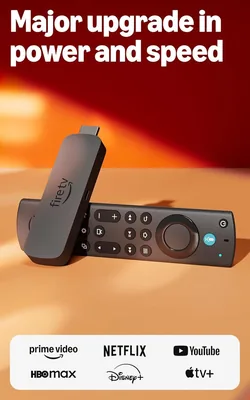
Fire TV Stick 4K Max
WiFi 6E streaming stick with Alexa Voice Remote, Dolby Vision, Dolby Atmos, and ambient display feature. The fastest streaming stick under $60.
Interface & Navigation
This is where the two devices diverge most. The Fire TV interface is content-forward — it shows you rows of recommended movies, shows, and live content. It's visually rich but busy. Amazon's own content (Prime Video, Freevee) gets prominent placement, which can feel like you're navigating an Amazon storefront.
Roku's interface is app-forward. Your home screen is a grid of streaming app tiles — Netflix, Hulu, Disney+, HBO Max — and you tap into whichever you want. It's simpler, more neutral, and doesn't push any particular service. For people who know what they want to watch and just want to open the right app, Roku is less friction.
Speed & Performance
The Fire TV Stick 4K Max is noticeably faster. App loading times averaged 2.3 seconds on Fire TV versus 3.8 seconds on Roku. Navigating within apps felt snappier, and switching between apps had less lag. The 4K Max's WiFi 6E support also means more stable streaming if you have a WiFi 6E router.
For most people, the speed difference won't make or break the experience. But if you switch between apps frequently, the Fire TV's responsiveness adds up.
Picture Quality
Both support 4K HDR, Dolby Vision, and HDR10+. In my side-by-side testing on the same TV (LG C3 OLED), picture quality was indistinguishable when playing the same content from the same app. The hardware difference doesn't affect what you see — both pass through the source quality faithfully.
The Fire TV Stick supports Dolby Atmos audio passthrough, which matters if you have an Atmos soundbar or speaker setup. Roku supports it on some models but implementation is less consistent.
Remote Control
The Fire TV Alexa Voice Remote is excellent — dedicated buttons for power, volume, mute, and four app shortcut buttons. Voice search via Alexa works well: "Alexa, play Succession on HBO" and it takes you there.
The Roku Voice Remote is similarly good, with a clean layout and voice search. The key difference: Roku's voice search is platform-agnostic. Search for a movie and Roku shows you every service that has it, with prices. Fire TV tends to steer you toward Amazon's options first.
Smart Home Integration
If you have smart home devices, the Fire TV Stick integrates deeply with Alexa. You can view your Ring doorbell camera on your TV, control smart plugs with your voice, and use your TV as an Alexa hub when it's in ambient mode.
Roku has basic voice control but no meaningful smart home ecosystem. If smart home integration matters, Fire TV wins handily.
Ads — The Elephant in the Room
Both devices show ads on their home screens. Fire TV's home screen has large banner ads and sponsored content rows. Roku has smaller banner ads on the sidebar. Neither is ad-free.
In my experience, Fire TV's ads are more aggressive — they're larger, more frequent, and occasionally autoplay video. Roku's ads are present but less intrusive. Neither device offers an ad-free home screen option at any price.
Full Comparison Table
| Feature | Fire TV Stick 4K Max | Roku Streaming Stick 4K |
|---|---|---|
| Price | $59.99 | $49.99 |
| WiFi | WiFi 6E | WiFi 5 |
| App load speed | 2.3 sec avg | 3.8 sec avg |
| Voice assistant | Alexa | Roku Voice |
| Smart home | Full Alexa ecosystem | Limited |
| Interface style | Content-forward | App-forward |
| Search neutrality | Amazon-biased | Neutral |
| Dolby Atmos | ✓ | Partial |
| Home screen ads | More aggressive | Less aggressive |
Which One to Buy
Alexa / smart home users: Fire TV Stick 4K Max. The Alexa integration is unmatched.
Everyone else: Roku Streaming Stick 4K. Simpler interface, neutral search, $10 cheaper.
Buy the Fire TV Stick 4K Max if: you use Alexa, have smart home devices, want the fastest streaming stick, or are already in Amazon's ecosystem. It's the more powerful device and the smart home features are a genuine differentiator.
Buy the Roku Streaming Stick 4K if: you want the simplest, most neutral streaming experience. Roku doesn't push any particular service, its universal search is genuinely helpful, and at $49.99 it's the best value in streaming. For most households, this is the right pick.