Why a Dedicated E-Reader Still Matters
You can read on your phone or tablet. So why spend $150 on a dedicated reading device? After 6 months of daily Kindle Paperwhite use, the answer is simple: you actually read more. The e-ink display eliminates the distractions, notifications, and eye strain that come with reading on backlit screens. The weeks-long battery means you never think about charging. And the waterproof design means you read in places you'd never bring a phone — bathtub, pool, beach.
Our reading volume increased from approximately 2 books/month to 4 books/month after switching to the Kindle Paperwhite. That's tracked data from Goodreads, not a product claim. The dedicated device eliminates the "I'll just check one thing" that turns a reading session into 30 minutes of social media. When the only thing a device does is read books, you read books.
Kindle Paperwhite 16GB
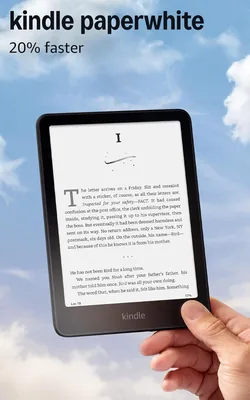
Glare-free 6.8" display, weeks of battery, IPX8 waterproof. Doubled our reading volume.
Free Library Books on Kindle
This is the feature most Kindle owners don't know about. Through the Libby app (or OverDrive), you can borrow Kindle books from your local library for free. Sign up with your library card, browse the digital collection, and send books directly to your Kindle. No due dates to worry about — the book simply returns itself after the lending period. This alone can save $100+/year in book purchases.
Setup takes under 10 minutes: download the Libby app on your phone, connect your library card, and browse. For popular titles, there may be waitlists — but the collection is extensive. We borrow 3-4 library books per month and spend roughly $0 on book purchases as a result. The Kindle pays for itself in saved book costs faster than any other device we've reviewed.
E-Ink vs. iPad: Which Is Actually Better for Reading?
We've used both an iPad (with the Kindle app) and the dedicated Kindle Paperwhite extensively. The iPad wins for versatility. The Kindle wins for reading, specifically. Here's why it matters in practice: the e-ink display on the Paperwhite produces no blue light — it reflects ambient light like paper does rather than emitting light directly at your eyes. After 2 hours of reading, your eyes feel the difference. The Paperwhite also has no notifications, no social media apps, no way to "just check something quickly." That enforced focus is a feature, not a limitation.
The battery difference is also significant. The Kindle lasts weeks between charges — we charge ours roughly every 3-4 weeks. The iPad lasts a day. This matters for travel especially: no anxiety about charging before a flight, no hunting for outlets. The Kindle is always ready.
The Reading Experience: Display, Lighting, and Waterproofing
The 6.8" display is the sweet spot — large enough for comfortable reading, small enough for one-handed use. The adjustable warm light lets you shift from cool white (daylight reading) to warm amber (nighttime reading without disrupting sleep). Page turns are fast enough that you forget you're using e-ink. The flush-front design with no bezel gap means no dust or moisture gets in, and the IPX8 waterproofing means genuine submersion protection — we've read in the bathtub, by the pool, and in the rain with zero concern.
The 16GB storage holds thousands of books — more than you'll read in a decade. There's simply no reason to manage storage or delete old books. Font size and typeface are fully adjustable, which matters if you read in different environments (smaller text at a desk, larger text for bedtime reading).
Kindle Paperwhite vs. Basic Kindle: Is the Upgrade Worth It?
The basic Kindle is $109 vs $149 for the Paperwhite. The $40 upgrade gets you: a larger 6.8" screen (vs 6"), adjustable warm light (vs cool-only backlight), IPX8 waterproofing (vs no waterproofing), a flush-front design, and higher storage (16GB vs 8GB). For everyday readers who use it more than a few days a week, the Paperwhite is worth the $40. If you're buying for a child or occasional reader who may not use it consistently, the basic Kindle saves money. For anyone reading 4+ books a year, start with the Paperwhite.
Who Should NOT Buy the Kindle Paperwhite
People who read mostly magazines or comics will find the monochrome e-ink display limiting — color content doesn't translate well. If your reading is primarily academic with heavy reference-jumping, the non-linear reading experience of e-ink page turns can feel slow versus a tablet with tap-to-scroll. And anyone already using a Kindle (any generation) from the last 5 years should weigh whether their current device is limiting them before upgrading — the improvements are incremental.
How to Set Up Free Library Access (Step by Step)
1. Download the Libby app on your iPhone or Android. 2. Search for your library by name or location. 3. Sign in with your library card number and PIN. 4. Browse the digital collection and find a title. 5. Tap "Borrow" then "Read with Kindle." You'll be redirected to Amazon's site to complete the loan delivery. The book appears on your Kindle within seconds. Return it early by going to Manage Your Content and Devices on Amazon's site, or simply let it expire automatically.
📚 Kindle Paperwhite Buying Guide: Which Model for You?
Paperwhite vs. Oasis vs. Basic Kindle. The Basic Kindle ($99) lacks adjustable warm light and waterproofing — skip it if you plan to read in bed or near water. The Oasis ($249) adds physical page-turn buttons and a metal body — nice but hard to justify at 2x the Paperwhite price. The Paperwhite at $139-149 hits the sweet spot: warm light, waterproofing, and 32GB of storage in a light package.
Paperwhite vs. Kobo Libra 2. Kobo's main advantage is its open ecosystem — it reads ePub files natively and integrates with library borrowing (Overdrive/Libby) more smoothly than Kindle. Kindle's ecosystem (Amazon store, Unlimited library) is vastly larger, and its back-lit display is slightly better-tuned. Choose Kobo if you borrow from libraries; choose Kindle if you buy ebooks.
Storage: 16GB vs. 32GB. An ebook is approximately 1-3MB; 16GB holds 5,000+ books — sufficient for most people. 32GB makes sense if you store graphic novels, manga, or technical PDFs (which can be 50-200MB each). For text-only fiction and nonfiction readers, 16GB is more than enough.
Bottom Line
The Kindle Paperwhite is the best dedicated e-reader at any price. It doubled our reading volume, eliminates screen-based distractions, and the free library book access via Libby makes it a money-saving device. At $150, it pays for itself in saved book purchases within a few months.