The Real Answer: Yes, After 2 Days
The first hour feels awkward. The first day feels distracting. By day 3, it's completely natural. We type at normal speed, take video calls without anyone noticing, and think through complex problems — all while walking at 1.5-2 mph. Three months in, sitting all day feels wrong. The walking pad fundamentally changed our work routine for the better.
Walking Pad Under-Desk Treadmill
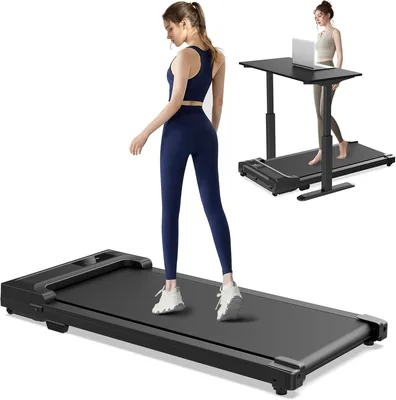
3 months of daily use. 8,000+ steps/day vs 2,200 sitting. Eliminated afternoon energy crashes.
The Data: 3 Months of Walking While Working
Steps: Walking pad days averaged 8,200 steps by end of workday vs 2,200 on sitting days. That's a 4x increase in daily movement without changing our schedule.
Energy: Afternoon energy crashes (the 2-3pm slump) disappeared almost entirely on walking days. This was the most noticeable and immediate benefit.
Productivity: No measurable decrease in work output. We tracked task completion, writing speed, and code commits. Walking at 1.5-2 mph does not impair cognitive work.
Typing accuracy: Identical to sitting after the 2-day adjustment period. We tested this deliberately with typing speed tests.
Video calls: At 1.5 mph, there's zero visible movement on camera. At 2 mph, very slight movement. Nobody has ever noticed or commented. The walking pad at walking speed (not running) is about 50dB — quieter than a normal conversation.
The Setup
You need a standing desk (we use the $130 electric standing desk). Set a memory preset for walking height (slightly higher than standing height to account for the pad thickness). The walking pad slides under the desk when in use and folds in half for storage against a wall. We walk for 45-60 minutes, then switch to standing or sitting for variety.
Who Should NOT Buy This
If you don't have a standing desk and don't plan to get one, skip this — it's useless without one. If you do work that requires extreme precision (detailed graphic design, surgery planning), the subtle movement might matter. And if you live in an apartment with noise-sensitive downstairs neighbors, the vibration may be an issue.
🚶 Walking Pad Setup Guide: Making It Work Daily
Standing desk height is everything. Your walking pad setup only works if your desk is at elbow height while you're walking. Measure your elbow height while standing naturally (approximately 38-44 inches for most adults at walking height) and ensure your sit-stand desk can reach it. A desk that tops out at 36 inches won't work — don't assume, measure first.
Speed calibration matters. 1.0-1.5 mph is the sweet spot for most knowledge work — fast enough for meaningful calorie burn, slow enough that typing, reading, and video calls are unimpaired. Some people find 2.0 mph workable for audio-only calls. Start slow and increase incrementally over the first week as you develop "walking multitasking" muscle memory.
The standing mat investment. A quality anti-fatigue standing mat under (or beside) the walking pad serves double duty: it cushions the impact when you step off the pad, and it provides a comfortable spot for standing-only tasks where you don't want to walk. Budget $40-80 for this — your joints will thank you after month two.
Bottom Line
The walking pad is the single most impactful product in our home office setup. $200 for 6,000+ additional daily steps, eliminated energy crashes, and zero productivity loss. It genuinely changed how we work. Pair it with a standing desk for the complete setup.