Best Budget Smart Home Under $150
The $140 Shopping List
Here's the exact setup I run in my apartment. Every device was purchased at retail and tested for at least 60 days. Total cost: $139.97.
| Device | Purpose | Price |
|---|---|---|
| Amazon Echo Show 5 | Voice control, smart hub, display | $49.99 |
| Kasa Smart Plug 4-Pack | Automate lamps, fans, coffee maker | $29.99 |
| Ring Video Doorbell (wired) | Front door security camera | $59.99 |
| Total | $139.97 | |
That's it. Three products, all WiFi-based (no separate hub required), all controlled by voice through Alexa. No electrician, no wiring, no tech skills needed. Setup time: under 30 minutes for everything.
Step 1 — Smart Display as Your Hub

Amazon Echo Show 5
Alexa smart display with 5.5-inch screen, camera for video calls, and smart home dashboard. Controls all your devices by voice. The brain of your smart home.
The Echo Show 5 is your command center. It sits on a nightstand or kitchen counter and controls everything else by voice. "Alexa, turn off the living room lights." "Alexa, show the front door camera." "Alexa, set the coffee maker for 7 AM."
Why the Echo Show over a basic Echo Dot? The screen. You can see your Ring doorbell camera feed, check the weather at a glance, see your smart home device status, and follow visual recipes while cooking. The screen adds genuine daily utility.
Step 2 — Smart Plugs for Automation
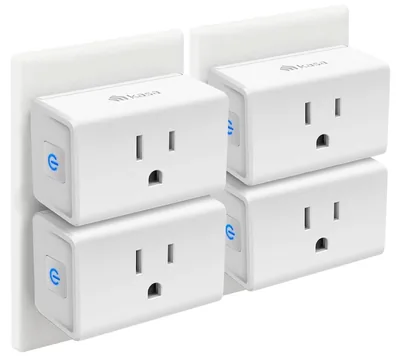
Kasa Smart Plug 4-Pack
WiFi smart plugs with individual app control, voice control via Alexa/Google, scheduling, and energy monitoring. No hub required. Setup takes 2 minutes per plug.
Smart plugs are the single highest-value smart home purchase. For $29.99, you get four plugs that make any "dumb" device smart. Here's how I use mine:
- Living room lamp: Turns on at sunset, off at 11 PM. Automated, never think about it.
- Bedroom fan: Turns on at 10 PM, off at 6 AM. Perfect sleep temperature every night.
- Coffee maker: Turns on at 6:45 AM. Coffee is ready when I walk into the kitchen.
- Desk lamp: "Alexa, turn on desk lamp" when I start work.
Setup is dead simple: plug in, download the Kasa app, connect to WiFi, name the plug. Total setup time for all four: about 8 minutes. Once connected, they also appear in the Alexa app automatically.
Step 3 — Video Doorbell
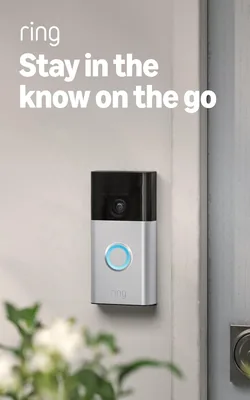
Ring Video Doorbell
1080p HD video doorbell with motion detection, two-way talk, night vision, and phone notifications. See who's at your door from anywhere.
The Ring doorbell is the most impactful security upgrade under $100. Motion detection alerts your phone when someone approaches, you can see and talk to visitors from anywhere, and the video quality is sharp enough to identify faces and read package labels.
The Echo Show integration is the killer feature: when someone rings the doorbell, the Echo Show automatically pops up the live camera feed. You can talk to the delivery person, confirm a visitor, or just check who's there — all without getting up.
Installation for the wired version takes 15-20 minutes with a screwdriver. Battery versions are also available if you don't have existing doorbell wiring.
Automated Routines That Save Time
Once your three devices are set up, create these Alexa routines in the app:
"Good Morning" routine: Say "Alexa, good morning" → turns on kitchen light, starts coffee maker, reads weather forecast and calendar. Total setup: 3 minutes in the Alexa app.
"Goodnight" routine: Say "Alexa, goodnight" → turns off all smart plugs, arms Ring motion detection, sets alarm. The house goes dark and locked in one command.
Sunset automation: Living room lamp turns on automatically at sunset. No voice command needed — it runs on a schedule that adjusts with daylight hours.
After 60 days, I estimate these automations save me 15-20 minutes per day in small tasks — turning things on/off, checking the door, managing devices. That's roughly 2 hours per week of tiny time savings that add up.
Common Beginner Mistakes
Buying too many ecosystems. Stick with one voice assistant (Alexa or Google). Mixing them creates compatibility headaches. All three products above work with Alexa natively.
Over-automating. Start with 3-4 automations that solve real daily friction. Add more later as you learn what works for your routine.
Buying WiFi devices with separate hubs. Every product I recommend is WiFi-direct — no Zigbee hub, no Thread border router, no extra hardware. Keep it simple when starting out.
Ignoring WiFi quality. Smart home devices need reliable WiFi. If your router struggles with 10+ devices, invest in a mesh WiFi system before adding smart devices.
Where to Go from Here
Once you're comfortable with the basics, here's what I'd add next:
- Smart lights ($30-50): Color-changing bulbs add ambiance and can automate with sunset/sunrise.
- Robot vacuum ($350-450): The Roborock Qrevo integrates with Alexa — "Alexa, clean the kitchen."
- Fire TV Stick ($59.99): Turns your TV into an Alexa display and streaming hub.
For the full smart home buildout, see my complete smart home for beginners guide which covers the expanded $253 setup.