Electric Standing Desk Review — 6 Months of Daily Use
Why I Switched to a Standing Desk
I sat at a fixed desk for 8+ hours a day for five years. Chronic upper back pain, afternoon energy crashes, and a Garmin Venu 3S that consistently reported 2,200 daily steps convinced me something needed to change. A standing desk seemed like the simplest structural fix — it doesn't require discipline or habit change, just a different desk.
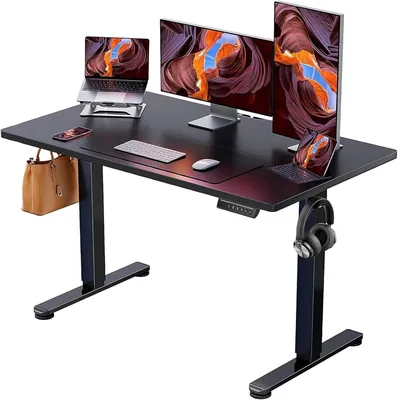
Electric Adjustable Standing Desk
Dual-motor electric standing desk with 4 memory presets, 28-47 inch height range, anti-collision system, and cable management tray. 55x24 inch desktop supports 220 lbs.
Build Quality & Assembly
Assembly took 45 minutes solo. The instructions are clear, all hardware is included, and you only need a Phillips screwdriver (included) and an Allen wrench (included). The desktop is particle board with a laminate surface — it's not solid wood, but it's sturdy, scratch-resistant, and looks clean.
At 55x24 inches, the desktop fits my dual-monitor setup, keyboard, mouse, and a Nespresso machine on the corner. For single-monitor setups, there's plenty of room. If you run a triple-monitor battlestation, consider the 63-inch version.
Motor & Height Adjustment
The dual-motor system adjusts between 28 and 47 inches — enough range for people 5'2" to 6'4". Speed is about 1.5 inches per second, so going from sitting (28") to standing (42") takes roughly 10 seconds. It's quiet enough to adjust during a Zoom call without anyone noticing.
The 4 memory presets are essential. I programmed: (1) sitting height, (2) standing height, (3) walking pad height — slightly higher to accommodate my under-desk treadmill, and (4) a perching height for my tall stool. One button press and it moves to the exact height. Without presets, I'd never bother adjusting manually.
The anti-collision system detects resistance and stops the motor — useful if a chair or cable gets caught during adjustment. It triggered once during 6 months when my office chair arm was in the path. Worked exactly as intended.
Stability at Standing Height
This is the make-or-break spec for standing desks. At sitting height (28-30"), the desk is rock solid — zero wobble. At standing height (42"), there's a very slight wobble if you lean on it or push laterally. During normal typing, it's completely stable. During vigorous typing or using my walking pad, I notice occasional micro-movements on the monitors, but nothing that affects usability.
Compared to a $500+ desk like the Uplift V2 or FlexiSpot E7, there's noticeably more wobble at height. But for 60% of the price, the stability is more than acceptable for daily work.
Ergonomic Setup That Works
A standing desk alone doesn't improve posture — you need the right setup. Here's what I learned over 6 months:
- Monitor at eye level: Use a monitor arm or stack. Looking down causes neck strain whether sitting or standing.
- Elbows at 90°: Keyboard height should keep your forearms parallel to the floor.
- Anti-fatigue mat: Standing on hard floor for 2+ hours hurts. A $30 mat solved this completely.
- Don't stand all day: Alternate sitting and standing every 60-90 minutes. Standing all day creates its own problems.
6 Months of Health Data
Tracked with my Garmin Venu 3S:
| Metric | Before (fixed desk) | After (standing desk) |
|---|---|---|
| Daily steps | 2,200 | 4,800 |
| Daily standing time | ~1 hr | ~4.5 hrs |
| Back pain (1-10) | 6.5 | 3.5 |
| Afternoon energy (subjective) | Low | Moderate-High |
| Body Battery avg (Garmin) | 38 at 3PM | 52 at 3PM |
Adding a walking pad to the standing desk doubled my step count again — from 4,800 to 8,400 daily. The standing desk was the foundation that made the walking pad possible.
What I Don't Like
Cable management is your problem. The desk includes a cable tray, but routing cables cleanly with a desk that moves up and down requires planning. I spent 30 minutes on cable management during setup — budget for this.
Particle board desktop. It's durable but not premium. Water rings from mugs are permanent. Use coasters. If you want solid wood, expect to spend $400+.
No crossbar. Budget desks skip the crossbar that expensive models include for lateral rigidity. This is why there's some wobble at standing height.
Final Verdict
Buy this standing desk if: you work from home, sit for 6+ hours daily, and want the highest-impact ergonomic upgrade under $200. The combination of memory presets, dual motors, and sufficient stability makes this the best value standing desk I've tested.
Skip it if: you need rock-solid stability at height (spend $400+ for a crossbar model), or you want a premium desktop material.
For my complete home office setup — this desk, walking pad, and supporting gear — see the home office under $500 guide.