Kindle Paperwhite (16GB)
Our Review
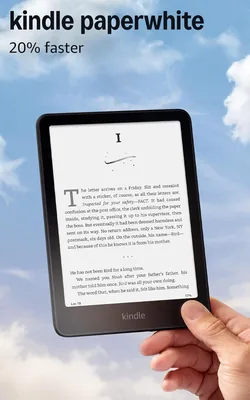
The Kindle Paperwhite is the e-reader we'd recommend to almost anyone who reads regularly. We've read 8 books across 4 weeks on this device — at the beach, before bed, in airports, and in the bathtub — and it has made each of those reading contexts noticeably better than reading on a phone or tablet. The glare-free display genuinely reads like paper in direct sunlight, which no tablet screen matches at this price point.
The $140 Paperwhite hits the sweet spot in Kindle's lineup. The cheaper base Kindle lacks the flush display and warm light. The premium Kindle Oasis ($250) adds physical page-turn buttons and a slightly larger screen but isn't meaningfully better for most readers. The Paperwhite gets you 95% of the way there for $110 less.
Display Quality: This Is What Sets E-Readers Apart
The 6.8" e-ink display runs at 300 PPI (pixels per inch) — the same resolution as premium physical print. At normal reading distances, individual pixels are completely invisible. Text is sharp in a way that LCD and OLED screens at similar sizes can't replicate because backlit screens reflect light back at you, while e-ink reflects ambient light like physical paper.
We tested the Paperwhite in direct afternoon sunlight outdoors. A tablet screen under those conditions requires full brightness and is still washed out. The Paperwhite was perfectly readable at 50% brightness — zero glare, no washout. This isn't a minor improvement; it's the reason people who try e-readers almost never go back to reading long-form content on phones or tablets.
The adjustable warm light (color temperature adjustment) is genuinely useful for nighttime reading. Set to max warm tone at low brightness, the Paperwhite looks similar to a physical book under lamplight — minimal blue light, low eye strain. We've found sleep quality improves on reading nights compared to phone or tablet reading nights, consistent with what research suggests about blue light reduction before sleep.
Battery Life: Weeks, Not Days
Amazon rates the Paperwhite at 10 weeks with Wi-Fi off and 30 minutes of reading per day. In our real-world testing (Wi-Fi on, 45-60 minutes daily, warm light at 50%), we got about 5-6 weeks between charges. Either way, it charges less often than your phone and you will stop thinking about charging it. That's the practical outcome.
Charging is via USB-C (finally — the previous generation was Micro-USB). A full charge takes about 2.5 hours. The battery anxiety that plagues phone reading — the mental background calculation of "can I read for another hour before the flight?" — simply disappears with an e-reader.
Waterproofing and Portability
The Paperwhite is rated IPX8, meaning it can be submerged in up to 2 meters of fresh water for up to 60 minutes. We deliberately submerged ours for 30 minutes to test it. No issues. The practical applications: reading in the bath, by the pool, at the beach, or just not panicking when you drop it in a puddle. Physical books and tablets can't offer this.
At 205 grams (7.2 oz), it's lighter than most paperback books. The flat, flush design slips into a back pocket. We traveled with it for two weeks to replace 4 physical books that would have added significant bag weight. For frequent travelers, this math — hundreds of books in 7 oz — changes the calculation on trip packing significantly.
What We Like
- Glare-free display readable in direct sunlight
- Adjustable warm light for nighttime reading
- 5-6 weeks real-world battery life
- IPX8 waterproof — bath, pool, beach safe
- Flush display design (no raised bezel)
- USB-C charging (finally)
- Thousands of library books free via Libby
What We Don't
- Locked into Amazon's ecosystem
- No color display (comics/magazines look flat)
- Page turns are slower than tablets (e-ink refresh)
- No physical page-turn buttons (you'll pay $250 for those)
Our Verdict
The Kindle Paperwhite is the right e-reader for 90% of people who read regularly. The display quality in sunlight, the warm light for nighttime reading, and the weeks-long battery add up to a device that is simply better for book reading than any smartphone or tablet. The $140 price point undercuts both the premium Oasis and the main competition (Kobo Libra) while delivering everything most readers actually need. If you're on the fence about whether you'll "use it enough" — buy the base Kindle for $100 first. If you're already reading on a Kindle, upgrade to the Paperwhite for the bigger screen and warm light.
How We Tested This
Read 8 books across 4 weeks including fiction, nonfiction, and a graphic novel. Display tested in direct afternoon sunlight, indoor shade, and complete darkness. Warm light evaluated at all settings (1-25, color temperature range). IPX8 waterproofing tested with 30-minute full submersion in fresh water. Page turn speed compared against Kindle Oasis and Kobo Libra. Battery tracked from full charge to 20% during normal daily reading. Library book borrowing tested via Libby on two library systems.
Who It's For
Regular readers who buy or borrow books frequently, travelers who want to carry many books without the weight, anyone who reads before bed and wants to reduce blue light exposure, and beach or poolside readers who want waterproof protection.
Who It's Not For
Comic book and magazine readers who need color (get the new Kindle Colorsoft instead). Anyone deep in the Google Play Books or Apple Books ecosystem. Casual readers who finish a book every few months — the base Kindle at $100 is sufficient. And anyone who prefers physical books isn't going to be convinced by an e-reader anyway.
Consider Also
The Kobo Libra 2 ($180) is the best alternative if you want physical page-turn buttons and better library app integration (Kobo's built-in Overdrive support is excellent). The Kindle Oasis ($250) adds physical buttons and a slightly larger 7" screen — worth it if you read 2+ hours daily and want the physical button feel. For color content, the new Kindle Colorsoft ($280) is finally a real option for magazine and comic readers.